Tuesday, 28 October 2014

Make cheap international calls with Tring app

Tring app
Hi friends, yesterday I posted about making cheap rate international calls with Flipcall app and today also, the topic is the same, only the app is different. Yes, today I'm gonna tell you about another app which is offering cheap rate calls, cheaper than Flipcall...!!
This app is called "Tring" and it offers national and international calls  at very cheap rates. I tested this app and it worked fine. Sometimes, call voice quality is poor because its the beta version but overall performance of this app is good. Here are the steps to use this app:

1. Download Tring app from play store, use this link to download it.
2. Now install it in your android device and open it.
3. Once you open the app, it will ask your mobile number. Just enter your mobile number.
4. Now this app will make a call to verify whether you are using your own number or an alive number.
5. Now after verification, the app is ready to be used.
6. Open the app and start making calls. For testing, this app gives free credits of $0.5 also.

Make cheap international calls with Tring app

Keep visiting for more tips and tricks.
Share:

Sunday, 26 October 2014

Make worldwide calls at cheap rates using Flipcall app

Make worldwide calls at cheap rates using Flipcall app

Hey friends, its very long I've posted any article. Actually I'm busy with my job and I hardly get some free time to update my blogs. But today I've got some time and hence I'm sharing a short post for you all. This post is about an android app called "Flipcall" (i think it is inspired from flipkart, lol) which is offering cheap national and international calls. I downloaded this app and tested and it worked very well. So, here is a short tutorial on using this app.

1. Download Flipcall app from playstore. Click here for the playstore link.
2. Now install it in your device and open it. It will ask for your mobile number. Simply enter your mobile number. The app will call on this number to connect with the other number and will use this number as your caller id.
3. Now after entering your mobile number, it will ask for the permission to read your contact list, simply allow it.
4. Now on your phone screen, you will see the contact list stored in your mobile. Just tap over any number you want to call and the app will call you.
5. Once you pick up the call, it will connect your call with the dialed number and that's it, you can start talking with your friend.
6. Currently, this app is offering free credit of $1 to make free calls. After using your free credits, you can add money in your wallet and use that to make calls at cheap rates.

making cheap calls with flipcall

Keep talking and keep visiting. Good day!
Share:

Wednesday, 1 October 2014

Get free recharge of Rs.110 by downloading gaana app

Get free recharge of Rs.50 by downloading gaana app

Hi there, today I'll share another great offer to get free recharge of Rs.50 just by downloading a small android app. Gaana.com is a popular site which offers premium music and latest releases. It is offering free recharge of Rs.50 to its new android app users. If you don't have an account on gaana.com, then you can use this offer and get a free talktime of Rs.50, follow the steps.

(OFFER EXPIRED) : NEW UPDATED TRICK IS GIVEN AT THE END OF THE POST
1. Download gaana app from playstore. Click here to download gaana app from playstore.
2. Now install it in your mobile and open it. After opening the app, tap login with facebook button and login with your facebook account.

login with facebook in gaana app

3. After successful login, you will get a popup message having a paytm Rs.50 instant discount promo code. Just note down that code and redeem it from paytm app or paytm.com website by doing a Rs.50 recharge using this promo code.

paytm free rs 50 recharge code

Note :
1) This offer is valid for new users only who don't have created any account on gaana.com
2) Only facebook id which is at least 90 days old and having 10+ friends will be eligible for the recharge promo code.

UPDATED NEW METHOD : Working Now
> Download gaana app from THIS LINK and install in your phone and use the referral code E5F5WM while sign up .
> You will get Rs.10 as sign up bonus. Now tap menu and from rewards section, get your referral link and share with your friends. For each referral, you will get Rs.20 paytm coupon.
> You can refer maximum of 5 friends and for them, you will get 20*5 = 100 rs paytm coupons.
> After collecting 100+10 Rs, you can redeem your coupons on paytm app. You can use them to add cash to your paytm wallet also.

Keep visiting for more tips and tricks.
Share:

Friday, 1 August 2014

Buy Asus Zenfone 4 At Lowest Price With Review

Buy Asus Zenfone 4 At Lowest Price With Review

Asus has recently launched its smartest budget phones "Zenfone 4", "Zenfone 5" and "Zenfone 6". After looking at the features of this phone, you will find that these phones are designed to compete with Moto E and Moto G. Asus has put its best in Zenfone 4 and tried to make it available at as lowest price as it can. Zenfone 4 is really a great option for the people who are looking for a powerful android smartphone at a very low price. Lets have a look over its features and configuration:
  • Dimension : 124.4 x 61.4 x 6.3-11.2
  • Weight : 115 g
  • Dual SIM : Yes
  • Network Support : 2G and 3G both
  • Display : TFT capacitive touchscreen with 16M colors, 4 inch screen size with 480x800 pixels and multitouch support. Screen protected with Corning Gorilla Glass 3
  • Sound : Loudspeaker support, 3.5mm jack
  • Memory : 8 GB internal, expandable upto 64 GB with micro SD card. 1 GB RAM
  • Data : 2G/3G support, WiFi, WiFi HotSpot, Bluetooth and Micro USB
  • Camera : 5 MP rear camera, 2592Ñ…1944 pixels with autofocus support. Video recording at 30fps with 1080p.
  • Front Camera : Yes, 0.3 MP
  • OS : Android 4.3 Jelly Bean, can be upgraded with 4.4 KitKat.
  • Chipset : Intel Atom Z2520
  • CPU : Dual Core 1.2Ghz
  • GPU : PowerVR SGX544MP2
  • GPS : Yes, with A-GPS, GLONASS
  • Battery : 1600 mAh, 12 Hours 3G talktime, Standby upto 192 hours
  • Others : panorama, face detection, accelerometer, proximity sensor, java support etc are other features of this phone.
  • MRP : Rs.5999 only
Buy Asus Zenfone 4 A400CG from Flipkart.com
Share:

Tuesday, 22 July 2014

Line app offering free talktime and goodies via FriendConverter

Line app offering free talktime and goodies via FriendConverted
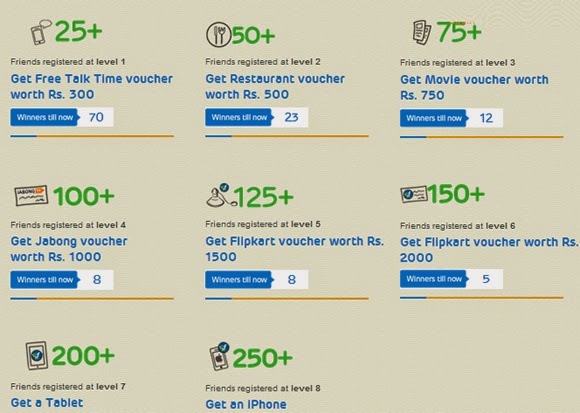
Line is a cool instant messenger app which can be downloaded for Android, iOS, Blackberry, Windows Phone, Windows PC and Windows 8 also. You can use it for chatting with your friends and making free voice and video calls. Recently, line has launched an offer via Friend Converter website in which you can invite your friends to use Line app and can earn free talktime, restaurant vouchers, shopping vouchers and can win a Tablet and an iPhone also. Excited...?? Let me tell you the procedure to get your prizes and do fast because this offer is just for one month only.

Steps To Enter In Line Free Talktime and Goodies Offer:

  • First of all, CLICK THIS LINK and download and install line app in your android device. If you are redirected to the homepage of FriendConverter, then register for a free account there.
  • Now after registering for an account, login to your account and get your unique link.
  • After getting your unique link, share it with your friends and tell them to click that link and download and install line app in their phone.
  • After successful Line registrations, you will get rewards as per the milestones decided.
line app reward plan

So what are you waiting for? Just click the above link and start spreading Line and get your free talktime and goodies.
Share:

Monday, 7 July 2014

How to get start menu in windows 8

How to get start menu in windows 8

Hi friends, if you are using windows 8 then you are aware of the metro start screen. In windows 8, Microsoft did not provide start menu in windows 8 and so many users were not happy with start screen. So later, windows provided windows 8.1 update and brought the start menu back. So many improvements were also included in this update.
Well, if you are still using windows 8 and want to add start menu in windows 8 then I'm going to tell you an easy way to get start menu for windows 8. Just follow the steps below:
  • Download iObit Start Menu for Windows 8 from this link.
  • After downloading the setup, install it in your computer.
  • That's it. Once the installation gets finished, you will see start button in the bottom left side of your screen.
  • Click that start button and access it as you used to do with other Microsoft OSs.
Keep visiting for more tips and tricks.
Share:

Monday, 30 June 2014

How to create shortcut icons for shutdown, restart and logout in windows 8

How to create shortcut icons for shutdown, restart and logout in windows 8
In windows 8, to access shutdown, restart and logout, we need to move our mouse in the top right corner and then use these options from the Settings>Power button. But what if you could get extra buttons for shutdown, restart and logout right on your desktop or in your taskbar, or in your taskbar?
Well, In this post, I'll tell you how to create shortcuts for shutdown, restart and logout in your task bar from where you can perform these actions just in a single click. simply follow the steps:
1. Right click on your desktop and click New > Shortcut.

new shortcut

2. Now type shutdown.exe /s /t 0 in the create shortcut box and click NEXT.

create shortcut

3. Now type the name of the shortcut, such as shutdown and click FINISH.

shutdown

4. Now a shortcut icon will be created on your desktop. Right click over this icon and click PROPERTIES. Then click CHANGE ICON.

change icon

5. Now select any icon you like and click OK. The icon of your shortcut will be changed.

select any icon

6. Now, you can drag it and drop into your taskbar to make it a shutdown button. In the same way, you can create shortcut buttons for logout and restart also. Use the following text for step 2:
Logout : shutdown.exe /l
Restart : shutdown.exe /r /t 0
That's it. You have created your shortcut icons for shutdown, logout and restart. You can download the buttons from this link also.
Share:

Wednesday, 25 June 2014

Apple iPod Giveaway Winner Announced...!!

Apple iPod Giveaway Winner Announced...!!

Hi guys, its time to announce the name of the winner of the giveaway Win Apple iPod Shuffle + JXD PMP + SanDisk MMC. As I told already that the winner selection process will be fair, I've made a live video of winner selection process. I've used my Random Number Generator app to choose the winner. So, here is the video of winner selection process.


And finally, the winner is comment number 6, SHUBHAN KUMAR. Congratulations Shubhan Kumar for your winning.
The winner must have to mail me his Identity proof. This may be a scanned copy of PAN CARD, PASSPORT, VOTER ID, AADHAAR CARD, ID CARD OF SCHOOL/COLLEGE. Mail me your complete postal address with your mobile number and ID Proof before 6th July 2014 to be eligible to get your prize. If the winner fails to send me the required details before 6th July 2014, the prize will be given to any other lucky winner which will be decided by my Random Number Generator app.

Update:
Prize delivered successfully to the winner. Here is the photo shared by him.

shubhan kumar
Share:

Tuesday, 24 June 2014

Give a missed call to get entertained and win free talktime

Give a missed call to get entertained and win free talktime

Hindustan Unilever Limited has started a unique mobile marketing initiative "Kan Khajura Tesan" which entertains the users as well as offers free talktime also! In this initiative, you have to give a missed call at toll free number 180030000123. After giving missed call, you will get a back call by automated computer which will entertain you just like a radio station for about 16 minutes. You will hear advertisements in between the call. At the end of the call, you will be asked some questions such as which is your favorite soap, which shampoo do you use etc, and after that, lucky winners will be rewarded free talktime. So, just give a missed call at 180030000123 and get started with Kan Khajura Tesan.
Share:

Sunday, 22 June 2014

Get Rs 10 recharge just for sign up and Rs 10 for each referral by Reward Eagle

Get Rs 10 recharge just for sign up and Rs 10 for each referral by Reward Eagle
Here is another great trick to get free recharge of Rs.10 by Reward Eagle. The best thing about this site is that it is using SSL certificate and pays the highest amount for each referral. For each referral, you get ₹10. Isn't it cool? Let me explain the procedure to get free recharge from Reward Eagle.

> Click the link given below to join reward eagle.
> Now click JOIN FREE and sign up with your facebook account.
> Now it will ask for the permissions to access your facebook information, allow the app.
> After signing up, login to your account and click ACTION tab. You will see your tasks to complete and get your first free recharge.

complete the actions

> Simply, complete each task and after completing the tasks, you earn 10 points. Note that 1 point = ₹ 1

10 points earned

> Now click on the REWARD tab and submit and verify your mobile number.

verify your mobile number

> After mobile verification, again click on REWARD tab and click PROCEED button.

select amount and click proceed to get recharge

> Your free recharge of ₹10 would be done immediately.

recharge done successfully

> Now share your referral link with your friends to earn more points. After collecting 200 points, you can redeem your free recharge of ₹200.
Keep visiting for more tips and tricks.
Share:

Custom Search Box

Blog Archive

Contact Form

Name

Email *

Message *